
Authentication & Access
How do I get an API token?
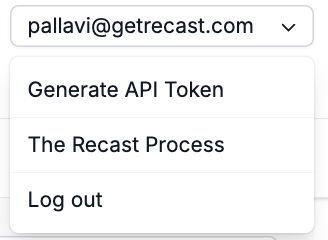
Log in to the Recast app, click your email address in the top right corner, and select Generate API token. Send this token as a bearer token in the Authorization header of every request.
What permissions does my token have?
Your token has full access to all data you can access in the application. It's scoped to your user account.
How do I find my client_slug?
Most endpoints require a client_slug to identify which client's data you're working with. You can find it in the URL when you're logged into the app in segment between /clients/ and /dashboards/:
https://app.getrecast.com/clients/democlient/dashboards/7
^^^^^^^^^^^
Can I have multiple tokens, and do they expire?
You can regenerate your token from the same menu at any time. Regenerating creates a new token and invalidates the old one.
What forms of authentication do you support?
The Recast API endpoints only support authentication via Personal Access Tokens. M2M authentication is not currently available.
Getting Started
Where is the full API reference?
The Swagger documentation is at app.getrecast.com/api-docs. It covers all endpoints, request/response schemas, and describes the parameters involved.
What is the base URL?
https://api.getrecast.com
Note the api. subdomain not app. The path structure is:
/v1/clients/{client_slug}/{resource}
Example: https://api.getrecast.com/v1/clients/democlient/optimizations
What programming languages are supported?
The API is a standard REST API accessible from any language. The documentation includes working code examples in R (using httr2 and jsonlite) and Python (using requests and pandas).
What's the recommended workflow when making a new API call?
For the Optimizer, Forecaster, and Insights APIs, the recommended approach is:
-
Run the analysis you want in the Recast UI first
-
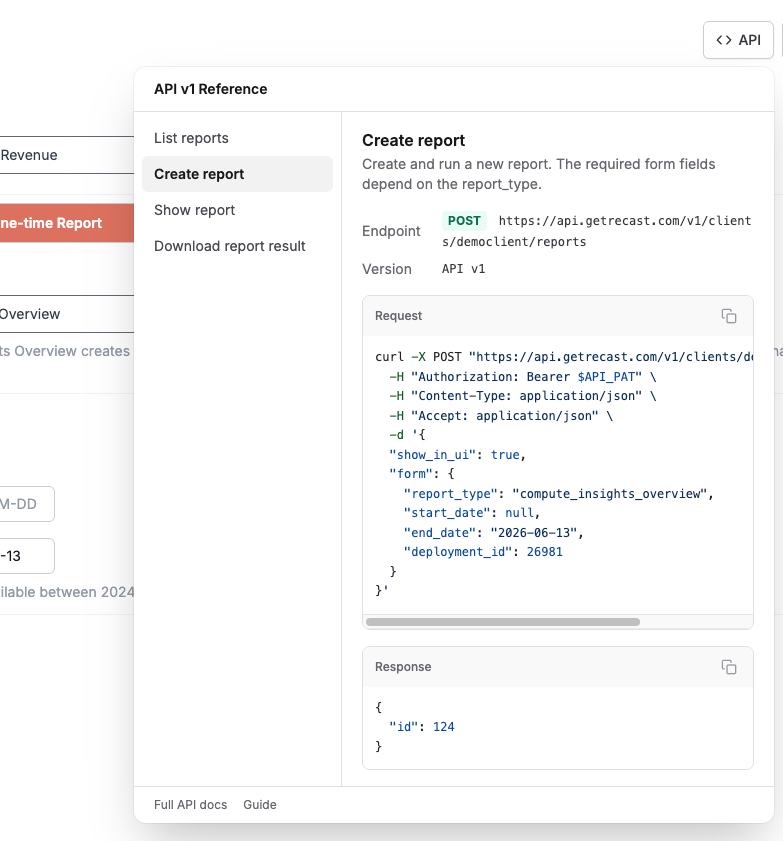
Use the API button to retrieve the specific formatting for the request
-
Make targeted edits and resubmit via
POST
This ensures all settings are correctly configured without having to construct the full form from scratch.
Where do I find the API request for something I'm looking at in Recast?
Every Reporter, Forecast and Optimizer page in Recast has an </> API button. Click it and Recast shows you the exact API request that produces what's on your screen – the endpoint, the full request payload, and an example response – already filled in with that page's real parameters and IDs. Copy the request into your terminal, a script, Postman, or an agent and you'll get back the same result you'd get in the app. The button works whether you're building something new or looking at a report or workflow you've already run.
The only thing you supply is your own access token. Recast never stores your token on the app side, so the request shows a $API_PAT placeholder where your token goes. The response shown in the panel is an example for reference; your live call will return your own data.
Rate Limits
How many requests can I make?
Limit Optimization, Forecast, and Spend Forecast creation calls to 25 per minute. Exceeding this may result in rate limit errors. Read endpoints (GET) are more permissive, but applying the same courtesy limit is a good practice.
Visibility: show_in_ui
What does show_in_ui do?
When creating an Optimization, Forecast, or Report via the API, show_in_ui controls whether it appears in the Recast application UI. Set it to false for programmatic/automated runs that don't need to be visible to app users to the UI uncluttered when running analyses in bulk or for testing.
Deployments
What is a deployment?
A deployment represents a specific model run. Recast typically generates a new deployment ID each time a model is updated (usually weekly). Deployments carry metadata like the model's last data date, historical spend, channel labels, and default budgets.
What does use_latest_deployments do?
When true (the default), the API automatically uses the most recently deployed model versions for each KPI, ignoring any deployment IDs you may have specified in depvar_configurations. This uses the latest models' data in the API call. Set it to false only if you need to pin to a specific historical deployment. For example, to reproduce a past result exactly.
How do I find available deployments?
Use the helper endpoints:
-
GET /deployments: lists all deployments, with optionaldashboard_slugfiltering -
GET /deployments/[id]: returns details for a specific deployment, including channel labels, model date, and (withextra_fields) historical spend and default budgets
Async Jobs & Polling
Why do I have to poll for results?
Optimizations, Forecasts, and Reports run asynchronously on Recast's backend. They can take anywhere from seconds to several minutes depending on complexity. The POST call queues the job and returns an ID immediately. You then poll the corresponding GET /[resource]/[id] endpoint until the status is no longer "ready" (ready to be processed) or "processing" (currently processing).
How do I know when a job is done and ready to download?
Poll GET /[resource]/[id]. When the job completes successfully, the response will include a results.downloads field listing the available CSV keys.
Downloads
How do I download results?
After you successfully create an Insights report, Optimization or Forecast, use
GET /[resource]/[id]/show/
to get the [key] from the results.downloads field in the response.
Then use
GET /[resource]/[id]/downloads/[key]
to get the download in CSV format.
Can I download plots?
The endpoints currently only return csv downloads found at the bottom of the reports in the UI, tables and highlighted values in the app.
AI access
Do you have a Recast MCP?
Yes! See documentation here: The Recast MCP