
Model Context Protocol (MCP) is a standard way for AI to communicate with servers that can perform actions at the request of AI. For the Recast MCP, the server is Recast and the AI taking actions is whichever LLM you connect it to. Currently the types of actions the server can perform on behalf of the LLM are:
-
Get info about model deployments (every time your model is refreshed, it gets a unique Deployment ID that identifies that model)
-
Pull reports run through the API, MCP, or in the app
-
Search for report types by keyword
-
Run reports
-
Get downloads associated with reports
-
Search existing Plans
-
Get Plan configuration and budget data across existing Plan versions
-
Get Forecasts and Counterfactuals from existing Plans
Right now, the MCP has access to thats Plans you create using the Recast UI as well as most reports that you can see in the Reporter in the Recast app (exceptions listed below). It also has access to previous models that have been deployed to the app, but are no longer visible (in addition to the latest models). However, there are a few limitations currently on the MCP:
-
It cannot return graphs, and data that is only shown graphically in the Reports is not available to it
-
The MCP cannot take actions in regards to the Optimizer, or GeoLift.
-
The MCP cannot create Plans, search Goals or return Adherence information.
-
The following Reports are not available: Upper funnel details, daily spend vs. KPI, prior vs. posterior, ROI/CPA waterfall, channel uncertainty drivers, and share of spend vs. share of effect. Other reports may return less data than is available in the Reporter.
We hope to expand its capabilities in the future.
Getting Started
Information about connecting the Recast MCP to your AI can be found here.
OAuth
The MCP uses OAuth to verify what data the Recast app has permission to send to the AI. When you first login you will be asked to sign into Recast and give authorization to pass your data through the MCP. Only those with access to the Recast app will be able to use the MCP. Once connected, you should assume the AI you are using can see any data available in your Recast account. What it does with that data and how it stores it will be determined by the Terms and Conditions of the LLM provider.
Starting a conversation
Once you have connected the MCP, you should be able to ask for Recast data in conversational language. We’ve noticed that it may be helpful to add “use Recast MCP” to the initial message, in order for the AI to understand that the questions you’re asking are meant specifically to be answered by the Recast tools. Also, if you have multiple models, it may be helpful to mention which model you are interested in pulling data from.
Once the AI begins using the MCP, you will typically see a set of “tool calls” which is the way that Recast and the AI communicate. A typical conversation will result in a series of calls that looks like this:
-
list_deployments to see all your model history
-
get_deployment to get the model you’re specifically interested in (usually the latest model!)
-
search_tools to find a plan or report that will answer your question
-
run_tool to get a forecast or budget associated with your Plan
-
run_report to run a report to answer your question
-
get_report will usually run several times, the first few to check to see if the report is done running yet (can take 1-5 minutes), and then at the end to fetch results
-
download_report to download a CSV of data from the report that may be helpful in answering your question
The run_report call is typically the one you’ll most want to pay attention to. You can inspect the arguments to ensure it used the date ranges, channels, etc that you expected.
Verifying accuracy
Most AI providers will allow you to peek into the tools that the AI is using as it’s making decisions. In Claude, this is done by expanding the small dropdown at the top of the chat:
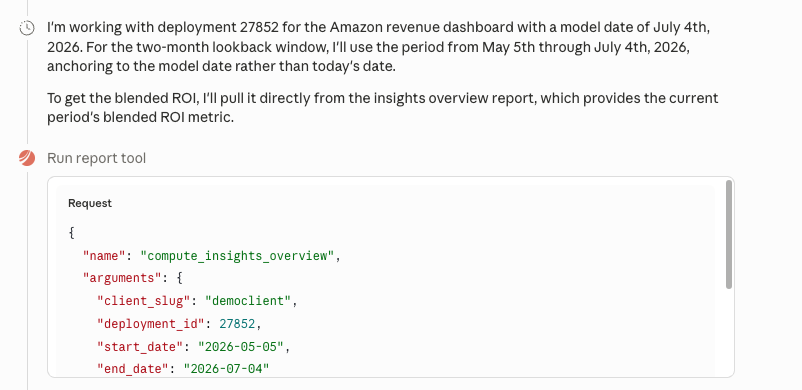
You can use these tool calls to verify things like the date ranges it selected and the reports it ran. You can read the documentation of each Report it ran in the Reporter Documentation to ensure it is getting the right information to answer your question.
The Claude Plugin
Plugins are a special tool offered by Anthropic that can bundle MCPs and Skills together. If you use Claude, we recommend installing the plugin instead of the MCP. The plugin currently contains:
-
The MCP
-
A getting started skill
-
A Plans skill
-
A Forecasting skill
-
An Optimizing skill
-
A Reporter skill
These skills teach Claude how to write code that hits our APIs to make these requests. Unlike the MCP they require a Recast PAT and scripts to be executed on your computer (usually written in Python). Using skills and code is the recommended workflow if:
-
You want to optimize and forecast (Optimizer and Forecaster not yet available via MCP)
-
You want to create jobs that execute on a schedule (e.g. pulling new data every Tuesday after the models refresh).
-
You want to build something that can be distributed to other members of your team that they can run themselves.
If you don’t use Claude, you can download and use these skills from our API documentation.
FAQ
Does the MCP make graphs?
MCP does not return any graphs currently, but most AIs will make graphs out of the data and display them if prompted.
Can anyone in my company use this?
You must have a Recast login in order to authenticate.
Do the Reports it creates show up in the app?
The Reports that are run by the MCP do not show up in the app.
What if my AI tool isn’t in the setup guide?
Please let us know, we are interested in expanding the list.
What if my company has policies against AI use?
The MCP itself is not an LLM, it is a tool used by LLMs. You should not install the MCP on any AI system that is not approved to process your company’s sensitive data.
Can Recast see my chats?
No. Recast can see the tool calls that your AI makes to fetch data, but the chats themselves happen between the user and the LLM provider. Recast has no access to the chat history.